English - United Kingdom
 English - Singapore
 日本語 - 日本
 한국어 - 대한민국
 Svenska – Sverige

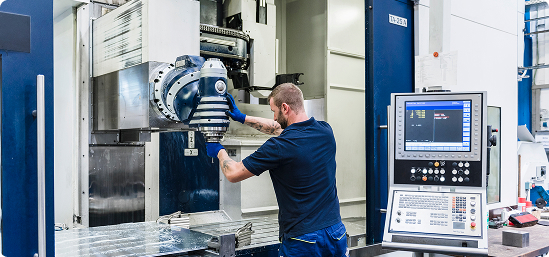
When machining workload outgrows your current capacity, we often think the first step is to invest in a new CNC machine.
But this might not be necessary. Instead, understanding where time is being lost, and where improvements can be made, can help you free up time on the equipment you already have.
What CNC capacity really means
CNC machine capacity is the maximum workload or throughput your CNC machines can handle. This can be measured in different ways, like parts-per-hour, or the number of hours cutting per day.
Capacity is integral to a manufacturer’s production speed, costs, and overall efficiency. In general, an increase in capacity allows for more work to be completed, raising profits.
How do you calculate CNC machine capacity?
Start with the time available on a machine. Subtract the time it can’t spend manufacturing. Divide the minutes by the cycle time for each part:
Potential parts per shift = (scheduled shift minutes − setup and downtime minutes) ÷ total cycle time per part
For a more realistic capacity estimate, use the full machine cycle, including loading and unloading, rather than just the cutting portion.
Example: What difference could a 25% shorter cycle make on capacity?
One CNC machine operating an eight-hour day shift. In 480 scheduled minutes, 60 are spent on setups and downtime, leaving 420 minutes for production.
| Before optimization | After optimization | |
| Available production time | 420 minutes | 420 minutes |
|
Total cycle time per part |
20 minutes | 15 minutes |
| Completed parts | 21 | 28 |
|
Results: 420 ÷ 20 = 21 parts per shift That's seven additional parts per shift, or 33.3% more potential output, from a 25% reduction in total cycle time—without adding another machine. |
||
To calculate capacity across a number of machines or shifts, repeat this exercise and then account for known constraints.
If you know of bottlenecks elsewhere in the production chain, or an average number of rejected parts, including these will give you a strong baseline against which to measure improvements.
Capacity vs. Utilization
Capacity is how much work a process could complete in a period of time, while utilization is how much of that capacity is actually being used. Measuring both will help you identify the difference between capacity and efficiency.
Greater production capacity can help eliminate bottlenecks. While all engineers aim to keep machines working as much as possible, overburdening critical machines can damage throughput, especially if parts are waiting.
What happens if CNC machine capacity is insufficient?
Manufacturers with more work than capacity can quickly find lead times extending as work piles up. This can mean delayed deliveries and rushed work. Limited CNC machine capacity often translates into costly overtime and overworked machines, increasing the cost it takes to create a part.
So, what factors can cause insufficient machine capacity?
1. Spindle performance - Power, torque, speed.
2. Machine stability - How stable your machine is at high speeds.
3. Controls - Sophistication of your machine’s controls.
4. Size and capacity - The physical size of the machine and its tool magazine.
5. Setups and changeovers - Lengthy setup times, preparing fixtures, and loading times all reduce overall capacity.
6. Waiting - Downtime, programming delays, missing material, tooling, and inspection can leave a capable machine empty.
7. Prove-outs - Dry runs, checks, and corrections on your machine occupy hours that could be spent in production. Use Vericut Verification to reclaim lost time.
8. Failures and stops - Broken tools, collisions, and unforeseen maintenance bring production to a halt.
9. Rework and scrap - Rejected parts or parts that need extra work consume capacity without increasing final output.
My capacity is at its limits. Are there alternative solutions to new machines?
Additional machines are a big investment for a manufacturing facility in terms of time, money, and space. These additional machines will need the production hours to justify their existence, and you may need more staff to help manage them.
It's worth first looking at optimizing your existing processes. Smart software, stronger tooling, and process improvements can free up capacity and increase throughput without investing in more machine tools.
Vericut offers a host of optimization software that can refine workflows, and help you get the most from your existing machines.
How to optimize capacity with software
Virtual process verification
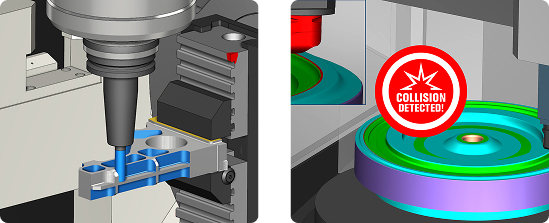
CNC simulation software, like Vericut, can simulate a CNC machine and programs in a virtual environment. This digital twin is used to prove processes, catch errors, and identify setup concerns before any actual machining starts. Manual prove-outs in a digital space are fast, and free up valuable machine capacity. They also prevent collisions and scrap.
The capacity benefit comes from moving as much checking and troubleshooting as possible away from the physical machine. Verifying the post-processed NC code, movements, tools, and fixtures before reaching the machine can reduce on-machine checks, boosting manufacturing time.
Collision detection
Crashes on CNC machines are expensive and time-consuming to deal with.
Any collision or over-travel halts production and eats up valuable capacity. Vericut identifies issues along the entire path of travel to prevent real-life incidents. The result is machining that is lower in risk, ensuring capacity is used for production and production only.
Toolpath optimization
While Vericut Verification prevents issues from occurring, Vericut Force improves cutting processes.
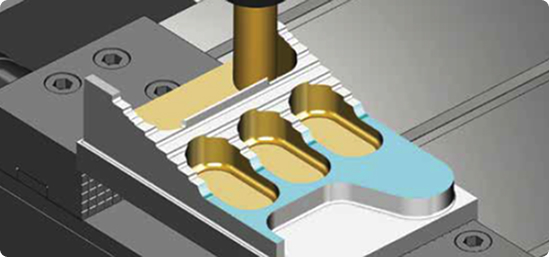
Advanced optimization software figures out the best feed rates and toolpath for peak efficiency. With Force, you can perfect your feed rates, chip load, and surface finish for smooth, consistent production and reduced cycle times.
Force users can find 25% savings on their cycle times and double the tool life, giving you back precious machine capacity.
Importantly, Vericut’s technologies link operations across the entire machining process. This holistic view is an essential asset for manufacturers looking to free up much-needed capacity.
Armed with these wide-reaching, detailed analytics, your engineers can tweak toolpaths and other processes in real-time to keep the spindle running as much as possible.
More specifically, Vericut Force analyzes cutting conditions in an NC program, including material engagement, chip thickness, cutting forces, and spindle demands, and adjusts programmed feed rates according to the defined limits. This can improve efficiency without changing the geometry of the original programmed toolpath.
What else can virtual planning assist with?
- Idle spindle time
- Identifying bottlenecks where production slows down
- Inefficient tool changes
- Cut-by-cut analysis
How Vericut increases capacity: Real-world example
iMFLUX
To increase metal removal rates, Ohio-based mould manufacturer iMFLUX tested Vericut Force Optimization across 9 machining tests.
The module made improvements of 17% and 45% on basic and complex geometries.
How did Force perform on a previously optimized program?
| Before Force | After Force | Time recovered | Cycle time reduction: |
| 6h | 5h | 1h recovered | 17% |
“On those considered more complex, reductions of up to 45% were typical.” Gary Bare, Advanced Manufacturing Engineer, iMFLUX
Other ways to optimize capacity
Machine optimization
There are multiple ways to improve your milling, drilling, and turning operations to make them more efficient and use less capacity.
Planned correctly, and with the right toolpaths, milling with high feeds and speeds can dramatically reduce roughing time and speed up production.
Similarly, enabling Constant Surface Speed (CSS) when turning keeps cutting conditions fast and efficient as diameters change, reducing production time.
How best to optimize your machine and process selection depends on what you’re producing.
Tooling & fixturing optimization
Finally, choosing the right tools and fixturing can make the difference between a great process and an inefficient one.
Higher-quality, advanced tooling designed for specific materials or processes offers extended tool life and faster cutting speeds. But in some cases, multi-function tools are suitable, slashing tool changes and space in magazines.
Similarly, fixturing choice plays a big role in production efficiency. Manufacturers who invest in faster technologies like zero-point clamps find they spend less time setting up jobs, and more time cutting.
Vericut’s superior simulation software can suggest improvements to tool selection to help you get the most out of your machines.
| USE VERICUT TO GET MORE OUT OF YOUR MACHINES | ||
| Create capacity | Increase output | Extend tool life |
|
“Force creates capacity without buying new machines – simply by getting the most out of your existing equipment. And it does that with minimal training.” Markus Rettenberger, Sales Engineer, Vericut |
"Notably, the software (Vericut) has allowed us to eliminate manual prove-out processes, freeing up machine time to run more parts.” Onur Benzergil, New Part Supervisor, HMS Makina. |
“With Force Optimization, we increased tool life to five pockets per tool—a tenfold improvement—and reduced cycle time by 25% to boot.” John Giraldo, Aerospace Engineer, Sandvik Coromant |
In conclusion:
Before committing to the cost and complexity of a new machine, it’s worth exploring how much more your current setup can deliver.
Vericut’s powerful simulation and optimization tools help manufacturers unlock hidden CNC machining capacity, cut cycle times, and improve part quality, all without adding hardware.
Investing in Vericut means smarter use of what you already have, making it a cost-effective first step toward greater productivity.
Talk to us about your machining capacity.