  • vericut intelligence icon
  • You make it, we simulate it.

    Book your free demo today.

    CAD to NC Program Verification: Ensuring the Design File Accuracy Before Machining.

    30 min read time

    Media-Jun-08-2026-06-45-46-2252-AM


    The cost and impact of machining errors continue to rise across modern CNC operations. Material prices, machine-hour rates, and scheduling pressures leave little room for mistakes.


    This makes the trustworthiness of design files a critical factor in every CNC machining workflow.

    When CAD models, manufacturing intent, and NC programs fail to align, the result is scrapped parts, machine downtime, and costly delays.

    Verifying CNC design files before machining is an essential step that gives teams confidence that what they machine is exactly what the engineer intended.
     

    Media-Jun-08-2026-06-49-06-5385-AM


    Why is design file trust in CNC machining important?


    Every job moves through a chain from design to machining. The process spans CAD modeling, manufacturing design validation, CAM programing, post-processing, setup planning, and on-machine execution.

    Errors can surface at any stage. A CAD revision may not be passed to CAM. A fixture assumption may not reflect what operators use on the shop floor. A small change in the post-processor can produce an unexpected machine movement.

    These disconnects lead to real and expensive consequences. Features may be missing, gouged, or machined oversize. Unmachinable geometry might slip through early checks. Toolpaths may not reflect design intent. Point cloud or imported surface data might not align with the solid model.

    First-part failures consume time and material, reduce machine utilization, and impact delivery schedules. Adopting NC verification to validate CNC design files early reduces these risks, and strengthens trust in the entire machining workflow.


    Common design-to-machine file mistakes.


    Brand Icons - light (1)-4
    Un-updated CAD revisions.
    CAM files sometimes reference older geometry when the CAD team has moved on. A missed revision can lead to scrap before anyone realizes the mismatch.
    Brand Icons - light (1)-4
    Stock definition discrepancies.
    If the raw stock size or orientation does not match what the CAM system expects, the machine may remove incorrect material or leave excess material behind.
    Brand Icons - light (1)-4
    Toolpaths misaligned with design intent.
    Missing pockets, incomplete features, or extra stock often appear when design changes are not fully reflected in CAM strategies.
    Brand Icons - light (1)-4
    Mismatches in surface or point cloud data.
    When a solid model is not available, and a point cloud or surface file is used instead, misalignment can occur unless the data is carefully validated.
    Brand Icons - light (1)-4
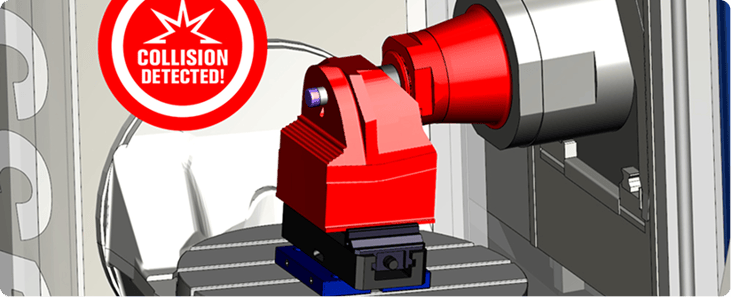
    Unchecked collisions or gouges.
    Without simulation and comparison tools, issues may only surface on the machine, increasing the likelihood of scrap or tool breakage.
    These issues underscore the need for robust CAD-to-NC program verification across all jobs, particularly for high-value and complex parts.


    How pre-machining verification software works.


    Effective pre-machining verification software ensures that the machined part will match the original design file. The process begins by running the actual NC code through a full machine simulation. This step goes beyond checking whether the toolpath runs. It evaluates whether the toolpath produces the intended geometry.

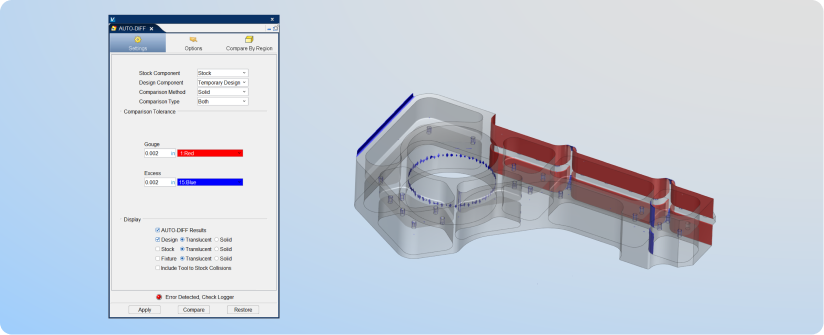
    Vericut’s AUTO-DIFF™ module is central to this process. It enables the comparison of the simulated part against the original CAD model or surface data.

    AUTO-DIFF™ CAD/CAM verification checks for excess material, gouges, mismatches, and deviations. It works with solids, surfaces, and point clouds, making it a powerful tool for pre-machining verification software.

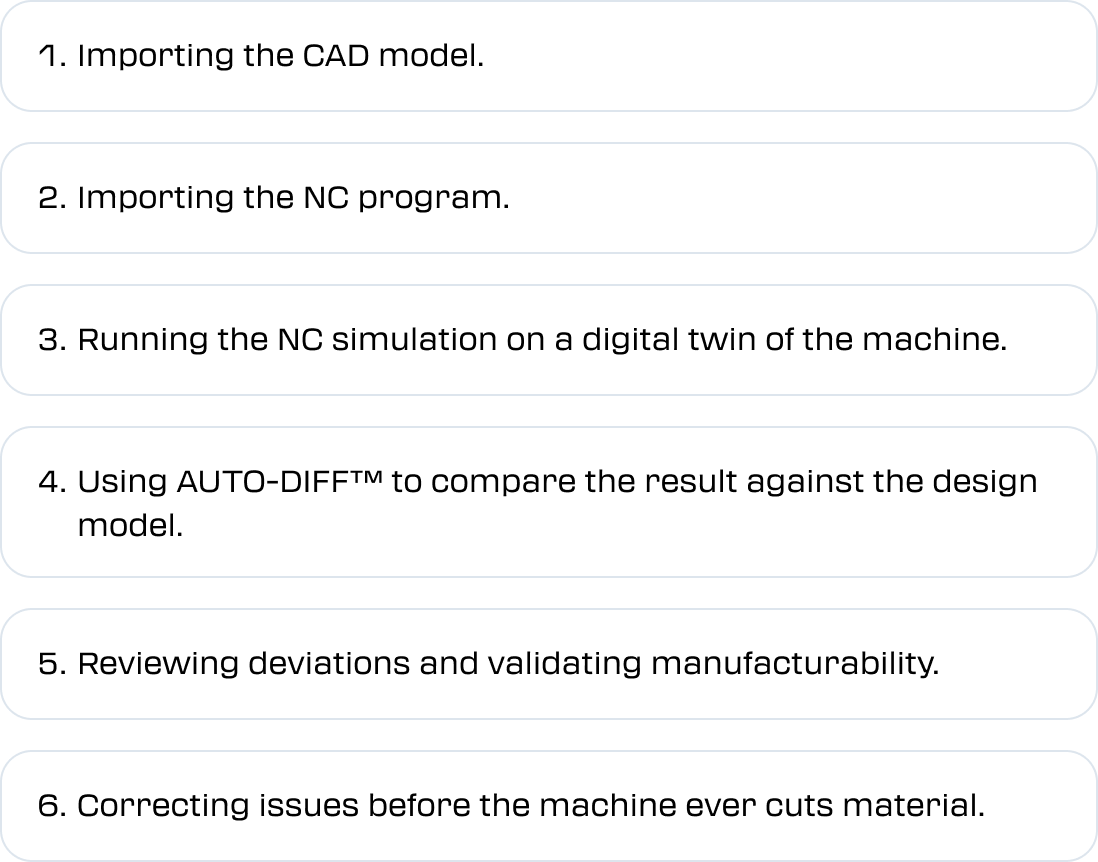
    A typical pre-machining verification workflow includes:
     

    Frame 48095584


    This process reduces machining mistakes with simulation, and establishes a repeatable method to ensure that design intent aligns with the machined part outcomes.


    Benefits of design file verification with AUTO-DIFF™.

    Brand Icons - light (1)-4
    Fewer first-part errors.
    Eliminating deviations early allows a faster ramp into production.
    Brand Icons - light (1)-4
    Reduced scrap and material waste.
    Identifying mismatches before cutting avoids costly errors in high-value materials.
    Brand Icons - light (1)-4
    More productive machine time.
    Fewer trials and corrections mean more spindle hours spent on profitable work.
    Brand Icons - light (1)-4
    Greater confidence in NC programs.
    Programmers and machinists know the part will match the design.
    Brand Icons - light (1)-4
    Improved reporting and traceability.
    AUTO-DIFF™ produces documented comparison results for quality and compliance needs.
    Brand Icons - light (1)-4
    Better cross-team collaboration.
    Design, programing, and production teams reference the same validated data, reducing miscommunication.
    These combined benefits build strong design file trust in CNC machining and help ensure consistent results across job types.


    “Vericut Simulation lets me know if I’m tearing my machine up, and AUTO-DIFF™ lets me know if my part’s good… It saves so much time, stress, and money for everyone involved.”


    Caset Carson

    CNC Programmer - NobleTek


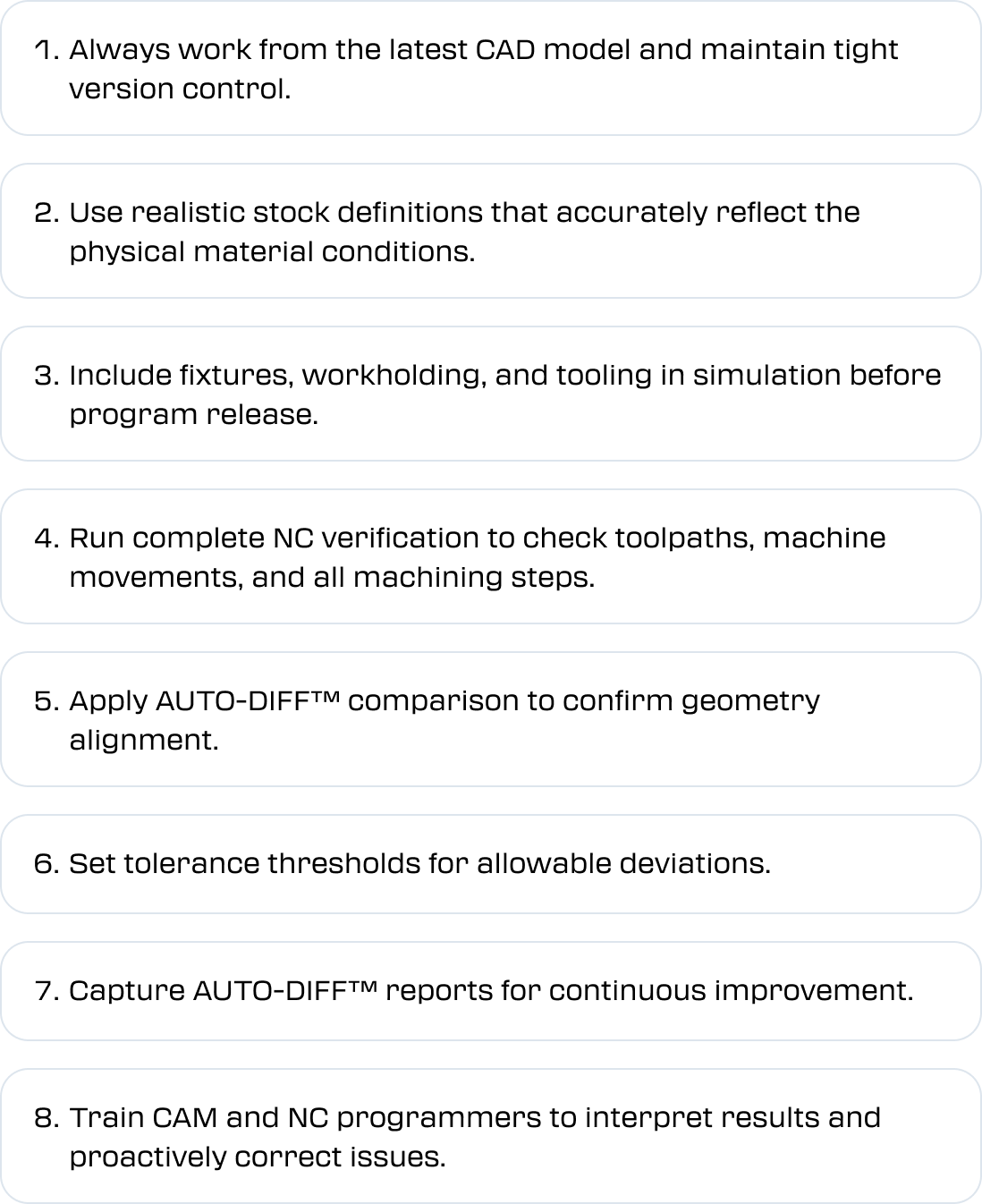
    Best practices for ensuring design file trust.


    Machine shops that achieve high design-to-machine accuracy follow disciplined workflows to ensure strong CAD/CAM verification, and efficiently validate manufacturing designs.
     

    Frame 48095588


    Media-Jun-08-2026-07-09-18-8206-AM


    Get started with AUTO-DIFF™ and Vericut Verification.


    Adopting a verification-first approach is straightforward and scalable.

    Start with jobs that are high value, high complexity, or carry strict quality requirements. Integrate verification directly into your workflow, from CAD to CAM to post-processing, followed by Vericut CNC Simulation and Verification, and AUTO-DIFF™ comparison.

    Establish internal standards that require design file verification before releasing NC programs to the shop floor.

    To see how AUTO-DIFF™ can strengthen your process, consider requesting a demo of Vericut today.


    CAD to NC Program Verification FAQs.

    01.
    What does AUTO-DIFF™ compare?

    AUTO-DIFF™ compares the simulated machined part to the original design model, checking for gouges, excess material, leftover stock, and geometric deviations.

    02.
    If I don't have a solid model, can I still use AUTO-DIFF™?

    Yes you can. AUTO-DIFF™ can work with surface files and point cloud data, allowing verification even when a complete solid model is not available.

    03.
    How does CAD to NC program verification differ from standard CAM toolpath checks?

    CAM systems typically verify internal toolpaths, but they do not simulate the actual G-code that is posted and executed on the machine. CAD to NC verification evaluates the actual machine-ready program, which catches issues introduced during post-processing or machine-specific behavior.

    04.
    Can CAD to NC program verification prevent machine crashes?

    Absolutely. Full NC verification simulates real machine kinematics, limits, accelerations, and tool changes. This prevents unexpected machine movements that could damage tools, fixtures, or the machine itself.

    05.
    What type of errors appear most often during CAD to NC verification?

    Common findings include slight gouges, incomplete cuts, unexpected excess material, incorrect tool engagement, and unmachined features. These issues often originate from post-processing or misunderstandings in the programed strategy.

    06.
    How much time can be saved by verifying design files before machining?

    Shops commonly report time savings of 20% or more because issues are caught early and first-part approvals are processed more efficiently.

    07.
    How does design-file verification support quality and compliance?

    Comparisons and reports from AUTO-DIFF™ provide shops with traceable evidence that the machined part aligns with the design intent, which is valuable for regulated industries.

    08.
    Is simulation and AUTO-DIFF™ necessary for every job?

    High-risk or high-value parts benefit the most, but even simpler jobs gain from the reduced chance of first-part errors and improved confidence during machining.


    09.
    How does CAD to NC program verification assist with multi-axis machining?

    Multi-axis programs introduce additional complexity with tool orientation, machine motion, and access angles. NC verification ensures that all movements follow the design intent and prevents collision risks that are more difficult to spot in CAM alone.


    Related articles:

    Reduce CNC Setup Time & Improve Profitability

    Top 7 Programming Mistakes in Multi-Axis Machining

    Frame 48095573

    We’re always on hand to help

    Vericut prides itself on delivering service that’s as superior as our software.

    That’s why our expert team of Technical Support Engineers is always on hand to answer your questions - no matter how big or small.