  • verticut intelligence icon
  • You make it, we simulate it.

    Book your free demo today.
    Hero image

    products:

    Vericut Icam Virtual Machine® CNC Machine Simulation Software

    See how your CNC machine will behave explicitly as you post-process your CAM file with Virtual Machine®, Icam’s machine simulation technology - now part of Vericut.

    Virtual Machine® enables NC programmers to graphically simulate and test programs against collisions, over-travel conditions and potential programming errors before they reach the shop floor.

    By combining CNC machine simulation with post-processing, Virtual Machine® helps manufacturers identify issues earlier, reduce prove-out risk, avoid costly machine tool collisions and improve confidence in the NC programs sent to production.

    Media (66)
    Frame 48095573 (5)

    Virtual Machine® can also be combined 
with CAM-POST® to support Graphic Post-Processing™, enabling machine simulation during post-processing.

    What is Icam Virtual Machine®?

    Virtual Machine® is Icam Post’s CNC machine simulation software for post-processing and G-code verification workflows.

    It allows NC programmers to graphically simulate machine tool motion, test NC programs, and identify possible issues before production begins.

    Media (67)
    Media (68)

    Virtual Machine® can help you detect:

    • Machine collisions.
    • Over-travel conditions.
    • Programming errors.
    • Tool, fixture and part interference.
    • Machine component collisions.
    • Material removal problems.
    • Gouges.
    • Excess material.
    • Inaccessible areas.
    • Rapid-motion collisions.


    This gives programmers a clearer understanding of how a CNC machine will behave before the program is run on the physical machine.

    Before we purchased Icam, programmers at C.E. Machine had to generate NCI through the CAM software, use a third-party post-processing software to post, and then import all part, stock, and tool models into a separate verification software, before programs could be sent to the shop floor.

    With the solution Icam has provided, programmers now use a single software suite to do all of the above simultaneously.

    icon
    Aaron Schwaiger
    NC Programmer at C.E. Machine Company

    Benefits of Icam Post Virtual Machine®.

    check-circle-2--checkmark-addition-circle-success-check-validation-add-form-tick (1)

    Simulate while you post-process

    Visualize machine motion during the post-processing phase instead of waiting until the end of the programming workflow.
    check-circle-2--checkmark-addition-circle-success-check-validation-add-form-tick (1)

    Machine Tool Motion Simulation

    Graphically review machine tool motion and synchronize with CAM-POST® at the point of a collision, over-travel condition or machine motion issue.
    check-circle-2--checkmark-addition-circle-success-check-validation-add-form-tick (1)

    Detect collisions earlier

    Identify possible collisions between the tool, part, fixture, machine components and in-process stock before production.
    check-circle-2--checkmark-addition-circle-success-check-validation-add-form-tick (1)

    Reduce over-travel risk

    Check machine motion against travel limits and size limits before programs reach the shop floor.
    check-circle-2--checkmark-addition-circle-success-check-validation-add-form-tick (1)

    More Efficient Post & Model Development

    Use shared CAM-POST® and Virtual Machine® data to reduce duplicated machine and controller setup work across post-processing and simulation environments.
    check-circle-2--checkmark-addition-circle-success-check-validation-add-form-tick (1)

    Cost-Effective NC Tape Proofing

    Proof NC output before production to help reduce scrap, minimize tool replacement, avoid machine downtime and support better part quality.
    check-circle-2--checkmark-addition-circle-success-check-validation-add-form-tick (1)

    Support G-code verification

    Use Control Emulator™ (where applicable) to simulate G-code and check the output that may be sent to the machine.
    check-circle-2--checkmark-addition-circle-success-check-validation-add-form-tick (1)

    Reduce prove-out time

    Move more program validation into the digital environment and reduce reliance on physical machine prove-outs.
    check-circle-2--checkmark-addition-circle-success-check-validation-add-form-tick (1)

    Support complex CNC environments

    Simulate mill-turn centers, multi-setup operations, advanced machines and different machine/controller pairings.
    check-circle-2--checkmark-addition-circle-success-check-validation-add-form-tick (1)

    Improve confidence before production

    Give programmers and manufacturing teams a clearer view of how the machine will behave before cutting material.

    Machine simulation during 
post-processing.

    SmartPATH® and SmartCUT™ can be especially powerful when used together.

    SmartCUT™ detects air-cut segments and identifies where the tool is not engaged with material. Instead of simply increasing speed along the same programmed path, SmartPATH® can calculate a faster, safer path to the start of the next cut.

    Together, they help manufacturers improve NC programs by combining air-cut elimination with intelligent path optimization.

    Media (63)

    Machine simulation during post-processing.

    Traditional CNC simulation often happens after the NC program has already been post-processed.

    That can create a slow feedback chain:

    01.

    CAM programming.

    02.

    Post-process.

    03.

    Simulate.

    04.

    Find an error.

    05.

    Return to the post or CAM system.

    06.

    Edit.

    07.

    Re-post.

    08.

    Re-simulate.

    Virtual Machine® helps significantly reduce that chain by integrating simulation directly into the post-processing workflow.

    When used with CAM-POST®, Virtual Machine® supports Graphic Post-Processing™, a real-time graphic simulation of the block-to-block machine tool motion instructions generated by the NC post processor.

    Because the post-processor and simulation engine use the same database, Virtual Machine® can provide real-time feedback during post-processing.

    This allows manufacturing issues such as collisions and over-travel conditions to be detected earlier in the workflow.

    Media (69)

    Machine Tool Motion Simulation.

    Virtual Machine® enables NC programmers to graphically simulate machine tool motion during the post-processing workflow.

    When paired with CAM-POST®, Virtual Machine® can synchronize with the post-processing environment at the point of a collision, over-travel condition, or machine motion issue.

    This allows programmers to examine the part program, NC output and machine movement at the exact point where the issue occurs.

    By connecting machine tool motion simulation with post-processing, programmers can better understand how the machine will behave before the program reaches the shop floor.

    This helps teams identify and resolve issues that could otherwise cause tool damage, fixture damage, defective parts or machine downtime.

    Frame 48095663 (1)

    More Efficient Post & Model Development

    Virtual Machine® and CAM-POST® use shared machine tool and controller data, helping reduce duplicated setup work across separate systems.

    Instead of entering the same machine and controller information into disconnected post-processing and simulation environments, manufacturers can work from a common data foundation.

    This supports more efficient post development, machine model development, and NC program validation, while helping ensure that the post-processor and simulation environment are aligned around the same machine behavior.

    For manufacturers developing or refining custom posts, this shared-data approach can reduce setup time, improve consistency, and support a more reliable post-processing workflow.

    Frame 48095663 (2)

    Cost-Effective NC Tape Proofing

    Virtual Machine® provides a cost-effective way to prove NC output before committing machine time, tooling or material.

    By detecting potential collisions, over-travel conditions, machine component interference, and programming issues during post-processing, Virtual Machine® helps manufacturers identify problems before they become shop-floor incidents.

    This can help reduce scrap, minimize tool replacement, avoid fixture damage, improve machine utilization, and support better part quality.

    For teams working with high-value parts, complex setups or expensive materials, Virtual Machine® gives programmers a practical way to validate machine behavior earlier in the process.

    Superior support for mill-turn machining centers.

    Virtual Machine® supports mill-turn machining center simulation, including applications with more complex machine behavior, such as:
    Frame 48095663 (11)

    Dual turret merging lathes.

    Frame 48095663 (11)

    Constant surface speed simulation.

    Frame 48095663 (11)

    Lathe tool insert definition.

    Frame 48095663 (11)

    Generic 3D tool holder definition.

    Frame 48095663 (11)

    Rotary axis definition as 
a spindle.

    Frame 48095663 (11)

    Rotary axis definition as 
a lathe tool turret.

    Virtual Machine® and Adaptive Post-Processing™.

    Virtual Machine® can also support a broader Adaptive Post-Processing™ workflow.

    Adaptive Post-Processing™ combines CNC post-processing, simulation, and optimization into a single connected process - reducing disconnected workflow steps, and improving programming efficiency.

    In fact, manufacturers can achieve potential savings of 25% to 35% in programming and machining cycle time when using Adaptive Post-Processing™.

    Media (70)

    Multi-setup simulation compatibility.

    Many manufacturing processes require multiple setups.

    Parts may be moved, reclamped or repositioned during production, and each setup change creates additional risk, especially when stock state, part location and clamping conditions change between programs.

    Virtual Machine® supports the simulation of multi-setup manufacturing processes that involve one or more changes to clamping and/or part location on the machine.

    It can also track the in-process stock state as a part progresses from one manufacturing program to another, helping programmers better understand the entire process rather than a single isolated operation.

    That can create a slow feedback chain:

    Media (71)

    Timeline control for NC program review.

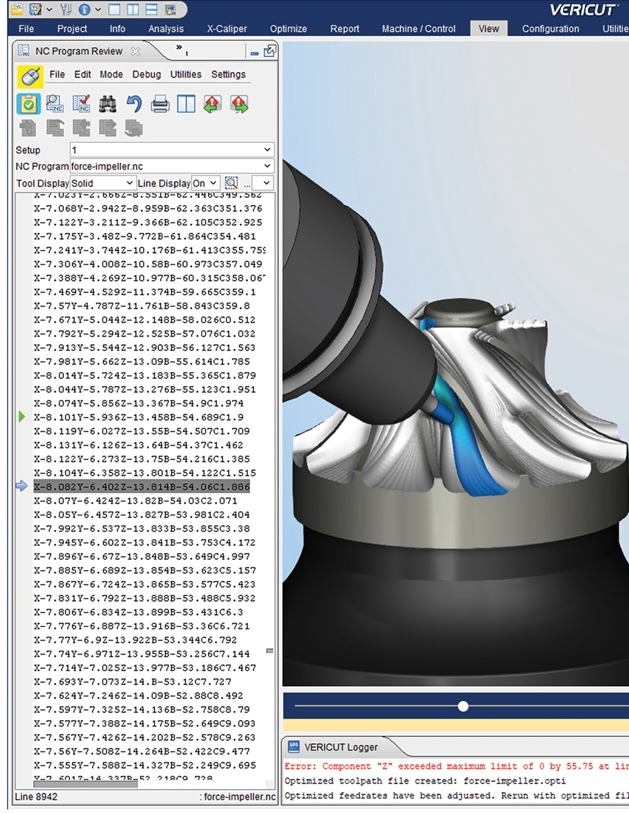
    Virtual Machine® includes timeline control for reviewing and playing back NC programs at any moment within the machining cycle.

    This supports bidirectional review and playback, helping programmers inspect machine motion, locate problem areas and better understand how the program behaves over time.

    Timeline control can help manufacturers:

    • Review machine motion more efficiently.

    • Move directly to areas of concern.

    • Analyze program behavior at specific moments.

    • Understand collision or over-travel events.

    • Improve post-processor output optimization.

    Media (72)

    Gather shop-floor documentation from your simulation.

    Virtual Machine® simulation workflows can support shop-floor documentation through the ShopDoc generator.

    ShopDoc can provide a breakdown of important job details, including tooling information, fixture positioning and part setup details for multi-setup operations.

    This documentation helps connect CAM programming, simulation, and shop-floor execution, giving operators and manufacturing teams clearer information before production begins.

    Need post-processor simulation for your machine?

    Talk to Vericut about your CAM system, CNC machine, and controller requirements.

    Our team can help you understand how Icam Post Virtual Machine® can support post-processor simulation, machine simulation, G-code verification, and CNC program validation in your manufacturing workflow.

    Media (73)

    Explore more Vericut products.

    Vericut Verification

    Detect errors, eliminate collisions and say goodbye to manual prove-outs once and for all.

    Vericut Force

    Optimize your tool paths and enhance your NC programs for the fastest, most efficient machines, ever.

    AUTO-DIFF™

    Compare CAD design modules to Vericut simulations and detect design differences and weaknesses.

    Multi-Axis

    Verify complex multi-axis machine applications and check for errors at the workpiece and the tool.

    Machine Connectivity & Monitoring

    Create and manage your most accurate digital twins ever by leveraging CNC machine data from your shop floor.

    Brand Icons - light

    Request a demo today.

    See how Vericut CNC simulation software can help your business forgo its CNC machining frustrations.  

    Address:
    Vericut USA
    CGTech Corporate Headquarters
    9000 Research Drive
    Irvine, California
    92618-4214

    Phone:
    (949) 753-1050