.png?width=60&height=60&name=Brand%20Icons%20-%20light%20(1).png)
.jpg?width=630&height=328&name=Media%20(14).jpg)
1. Basic simulators with 3D visualisation
Entry-level NC code simulators are designed primarily for beginners and trainees, allowing users to load and run G-code in a simplified environment.
Tools such as NC Viewer and CAMotics are helpful for checking simple G-code, viewing 3D toolpaths, or displaying 2D line plots.
Pros: Low cost, easy to use, and often browser-based. They offer a gentle introduction to G-code programming and help identify syntax errors or unusual movements.
Cons: Not suitable for precision manufacturing or professional production environments. These tools typically lack collision detection, machine kinematics, and controller logic, limiting their usefulness to education or basic checks.
2. Full machine and G-code simulation systems
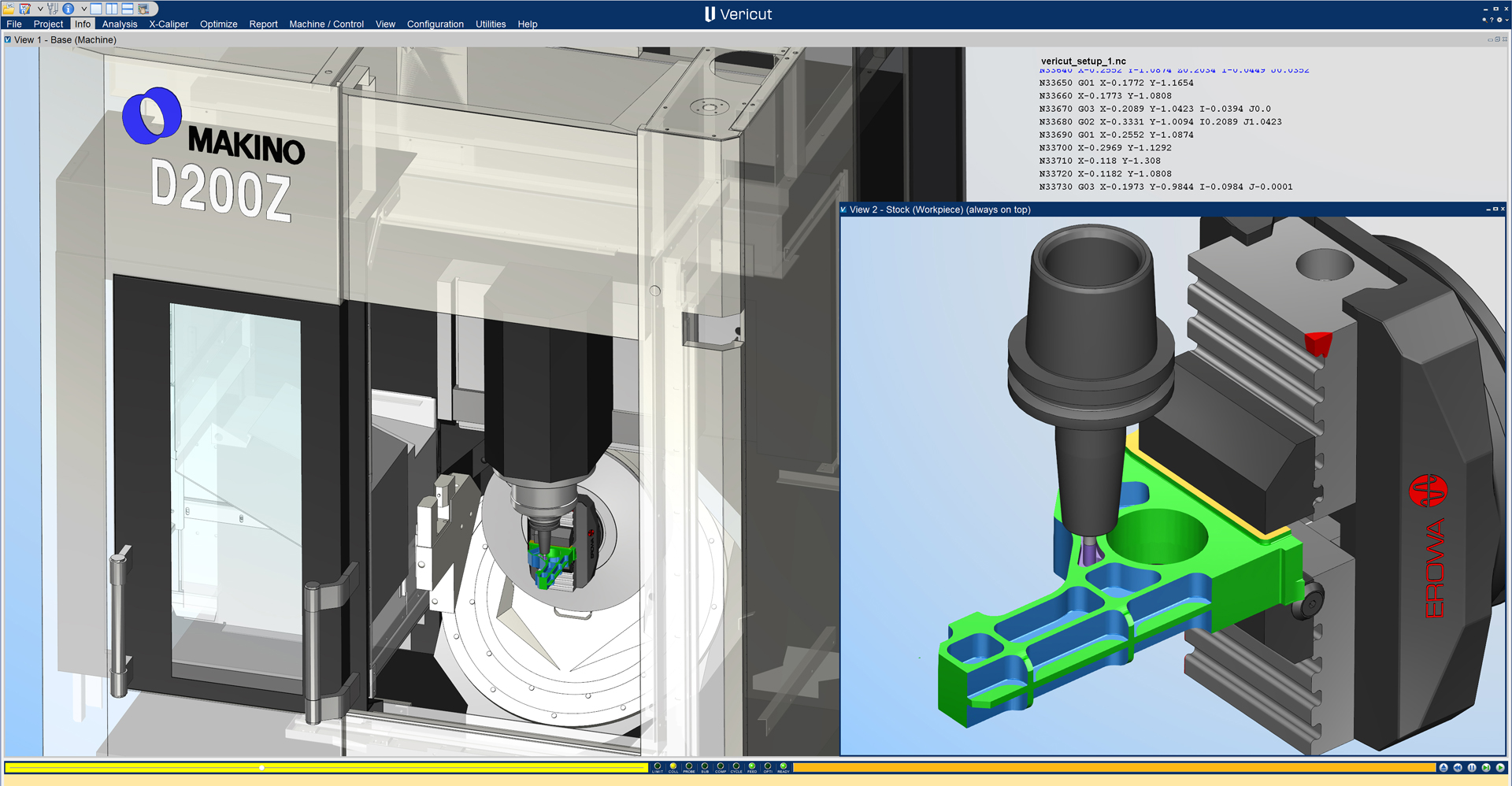
Full machine simulation systems, such as Vericut CNC Simulation Software, create highly detailed digital twins of CNC machines, including its axes, spindles, tooling, etc.
They accurately replicate real-world G-code and machine behavior supporting the advanced machining strategies such as 5-axis machining, mill-turn operations, and multi-spindle configurations.
Vericut is widely recognised as a leader in full machine simulation and is trusted by many of the world’s most demanding industries.
Learn how Vericut Verification helped Sandvik-Gimo achieve a 15.3% energy saving per workpiece
This level of G-code simulation is critical for validating programs on high-value machines producing mission-critical components. Unlike basic simulators, advanced systems can model machine limits, controller behavior, and multi-channel code while delivering highly realistic 3D visualisation.
The result is faster identification of issues that could otherwise lead to overtravel, collisions, or inefficient machining.
.jpg?width=630&height=356&name=Media%20(15).jpg)
3. CAM-integrated simulators
Some G-code simulators are built into CAM systems. These tools simulate toolpaths after programming, making them useful for early-stage validation or quick checks.
They can streamline workflows for simpler parts and processes, but their capabilities are often limited when it comes to complex g-code verification or full machine simulation.
.jpg?width=630&height=317&name=Media%20(16).jpg)
1. NC Code interpretation and processing
This refers to the accurate interpretation of G-code and control logic exactly as a CNC machine would execute it. Vericut excels in this area by replicating every aspect of real-world CNC behavior.
Proper NC code processing ensures that the simulation reflects what will actually happen on the machine—not just movements, but also travel limits, feed rate overrides, tool data, and control logic.
2. Toolpath verification & optimisation
One of the key advantages of G-code simulation is the ability to visualise toolpaths clearly. High-quality simulators provide graphical toolpath displays that show precisely how and where a cutter will move.
Users can step through the code to examine rapid moves, identify incomplete features, or pinpoint errors before machining begins.
With this capability, machinists and engineers can understand exactly how a part will be produced, step by step. Tools like Vericut also include advanced analysis functions to simplify and clarify toolpath behavior.
Learn how Vericut Force™ helps AML reduce cycle times by up to 40%
3. 3D model rendering
Modern G-code simulators deliver realistic 3D representations of machine tools, fixtures, tooling, and stock. With software such as Vericut, users can zoom, rotate, and inspect the machining process from any angle and at any speed.
A robust 3D engine accurately depicts material removal, tool geometry, holders, fixtures, and moving machine components such as tables and spindle heads. Vericut’s simulation recreates the full machining environment in precise 3D detail.
4. Virtual material removal
G-code simulators remove the need for trial cutting or wasted material by simulating the removal of stock as machining operations are executed.
The software begins with a defined stock shape—such as a block, bar, or casting—and subtracts material as each tool movement intersects the stock.
This is essential for verifying that the finished part matches the design intent and for identifying issues such as gouges or unmachined material caused by missed or incorrect toolpaths.
5. Machine collision detection
Advanced G-code simulators model interactions between all machine elements, including tools, holders, spindles, tables, fixtures, and machine structures. They identify overtravel, axis interference, and unsafe approach angles before damage occurs.
Advanced simulators continuously monitor for collisions between every entity—tool-to-part, tool-to-machine, machine-to-fixture, and more. They also detect conditions such as exceeding travel limits or aggressive movements into material. Collision detection is one of the most critical capabilities for protecting machines and tooling.
.jpg?width=630&height=361&name=Media%20(17).jpg)
Step 1: Analysis of cost benefits and ROI
If you produce simple components in very low volumes, a full machine simulation system may not be commercially justified.
However, for manufacturers producing precision components, the return on investment for a tool like Vericut is often realised by preventing just one machine crash or scrapped part.
Careful financial analysis will help determine the most suitable type of G-code simulator for your operation.
Step 2: Consider compatibility
Vericut is compatible with most major machine tools, CAD/CAM systems, and tool management platforms, enabling seamless integration into existing workflows.
It’s worth consulting an expert to confirm compatibility if your CAM system is compatible with your chosen software, determine whether plug-ins are required, and ensure your hardware has sufficient CPU and GPU performance.
Step 3: Ease of use
Advanced systems such as Vericut offer exceptional depth and flexibility but may require structured training to achieve optimal results. Simpler tools are easier to learn but lack the power of full G-code simulation.
Vericut provides comprehensive and widely used training programmes.
Step 4: Support and updates
Choose a G-code simulator that is actively supported and continually updated. Long-term viability depends on ongoing development and responsive technical support.
Premium partners such as Vericut go beyond software delivery, acting as an extension of your engineering team to help diagnose and solve complex manufacturing challenges.
.jpg?width=630&height=358&name=Media%20(18).jpg)
G-code simulation tools are increasingly moving towards cloud-based solutions, shifting computational workloads away from local machines and improving accessibility.
Machine learning and AI will continue to enhance simulation capabilities, improving pattern recognition, diagnostics, and problem-solving. Over time, these technologies will make simulation software more conversational, intuitive, and accessible—especially for new users.
.png?width=465&height=311&name=Media%20(1).png)


 English - Singapore
 English - United States
 한국어 - 대한민국