.png?width=60&height=60&name=Brand%20Icons%20-%20light%20(1).png)
.jpg?width=630&height=328&name=Media%20(14).jpg)
1. Basic simulators with 3D visualization
Basic, entry-level NC-code simulators exist to help beginners and trainees learn the ropes by loading and running G-code in a stripped-back environment.
Software like NC Viewer and CAMotics are useful tools for checking simple G-code, 3D toolpaths, or 2D line plots.
Pros: Low-cost, easy-to-use, and often capable of running through a browser. Simple and comfortable entry into G-code programming, including spotting syntax errors or odd movements.
Cons: Not suitable for serious manufacturing of precision parts and components by experienced engineers. These tools generally offer little to no collision detection, kinematics, or controller logic, making them useful for a sanity check or for education.
2. Full machine and G-code simulation systems
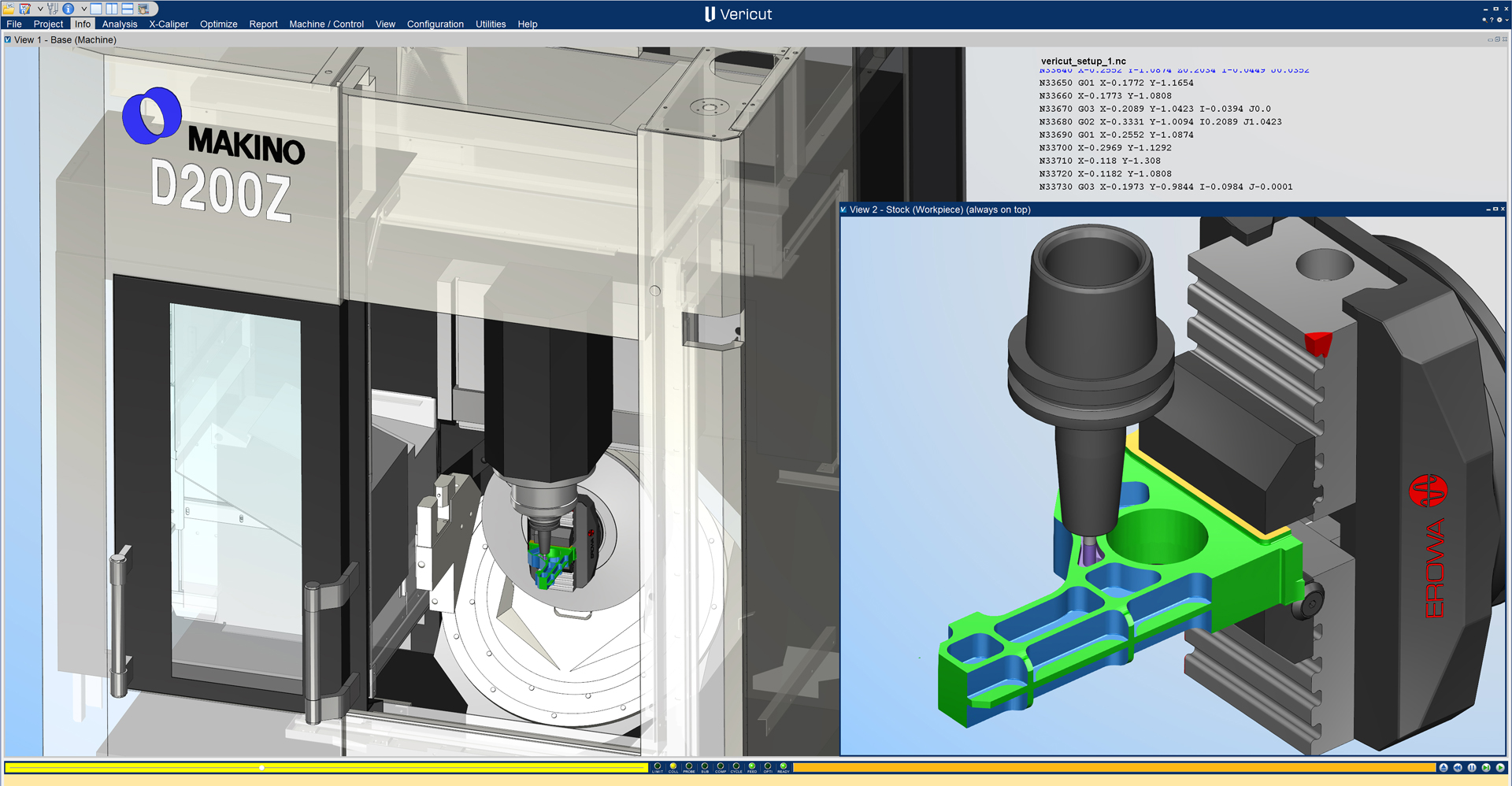
Full machine simulation systems, like Vericut CNC Simulation Software, create highly detailed and realistic digital twins of a CNC machine, including its axes, spindle(s), tooling, etc.
They replicate real-world G-code and machine behavior supporting the complex cutting operations needed to produce high-precision parts, like 5-axis machining, mill-turn, and multi-spindle setups.
Vericut is the leading example of full machine simulations, trusted by the biggest and the best in top industries.
Learn how Vericut Verification helped Sandvik-Gimo achieve a 15.3% energy saving per workpiece
G-code simulation software is critical for validating programs on expensive machines producing critical components. Unlike basic simulators, products like Vericut can simulate machine limits, controller behavior, and multi-channel code, while also providing a detailed 3D visualization of the machine and parts.
This benefits engineers and machinists to quickly and easily detect issues that could lead to overtravel, collisions, and inefficiencies.
.jpg?width=630&height=356&name=Media%20(15).jpg)
3. CAM-integrated simulators
Some G-code simulators are built directly into popular CAM packages. These simulate toolpaths after programming, making them useful for early-stage validation or quick checks.
They can be a great option for streamlining workflows or when working with more basic processes and parts, but these integration options are limited when it comes to complex verification or checks.
.jpg?width=630&height=317&name=Media%20(16).jpg)
1. NC Code interpretation and processing
This is the accurate processing of G-code and logic as a real CNC control would. Vericut excels in this regard by replicating every facet of real-world CNC behaviour.
Proper NC code processing ensures that what you see in simulation is a true representation of what will happen on your machine, which is crucial for trust in the simulation results. It’s not just about moves; it’s also about respecting travel limits, feedrate overrides, tooling data, and so on.
2. Toolpath verification & optimization
One of the key advantages of G-code simulators is the ability to visualize your toolpaths. High-quality simulators generate a graphical toolpath display that shows exactly how the cutter will move throughout the program.
By stepping through the code, you can review rapid motions, identify incomplete features, and spot potential errors before they reach the machine. This step-by-step visualization allows machinists and engineers to understand precisely how a part will be produced before any material is cut.
Advanced tools like Vericut go further by adding detailed analysis, making toolpaths easier to understand, verify and optimize with confidence.
Learn how Vericut Force™ helps AML reduce cycle times by up to 40%
3. 3D model rendering
Modern G-code simulators offer realistic 3D renderings of machine tools, fixtures, and stock. With tools like Vericut, users can rotate, zoom, and analyze the cutting process from any angle and at a speed that suits them.
A powerful 3D engine enables the simulator to depict material removal from the stock, along with accurate tool geometry, holders, fixtures, and even machine components such as the table and spindle head in motion. For example, Vericut’s simulation recreates an exact machining environment in 3D.
4. Virtual material removal
G-code simulators eliminate the need for test cuts or waste raw stock by simulating material removal from stock to completed part. The software starts with a defined stock (block, bar, casting, etc.) and subtracts material when the cutter intersects the stock as each motion is executed.
This is crucial for verifying that the final machined part matches the intended design and for finding any machining errors like gouges or excess material left (perhaps due to a missed toolpath).
5. Machine collision detection
G-code simulators simulate interactions between all machine components: tools, holders, machine heads, spindles, tables, and fixtures. They flag over-travel, axis interference, or improper approach angles in advance to avoid damage.
Advanced simulators continuously monitor for collisions between all entities: tool with part, tool with machine, machine with part/fixture, etc. They also check for scenarios like the tool going beyond machine travel limits or moving too fast into material. Collision detection is one of the most important features for preventing machine damage.
.jpg?width=630&height=361&name=Media%20(17).jpg)
Step 1: Analysis of cost benefits and ROI
If you produce simple parts in very small volumes, investing in a full machine simulation solution may not be cost-effective.
However, for manufacturers producing high-precision components at scale, the return on investment from tools like Vericut is often realized after avoiding just one machine crash or scrapped parts.
Ultimately, evaluating your own production requirements and costs will help determine which type of G-code simulator is the right fit for your operation.
Step 2: Consider compatibility
Vericut works with almost any major machine tool, CAD/CAM software, and tool management system. These interfaces ensure seamless operation with your current tech.
It’s certainly worth speaking with an expert to discover if your CAM system is compatible with your chosen software, if you’ll need plugins, and if your computer systems have the CPU and GPU power to run a G-code simulator.
Step 3: Ease of use
Powerful advanced systems like Vericut may require proper training to use correctly and get the best results. Simpler tools offer guided processes, but lack the depth or flexibility of full G-code simulators.
Vericut offers popular and comprehensive training modules.
Step 4: Support and updates
Select a G-code simulation solution with proven long-term support to ensure lasting value for your investment.
Ongoing development and responsive technical support help keep the software relevant for years, while also providing assistance with new or custom setups as your needs evolve.
Leading solutions like Vericut go beyond software, acting as trusted partners that extend your engineering team to help identify, diagnose, and resolve complex manufacturing challenges.
.jpg?width=630&height=358&name=Media%20(18).jpg)
G-code simulation tools are increasingly shifting to the cloud, offloading intensive processing from local machines and enabling more flexibility access for users.
Advanced machine learning and AI will continue to improve G-code simulators by enhancing pattern recognition and problem-solving abilities. AI, in particular, will allow simulation software to become increasingly conversational and user-friendly for beginners.
.png?width=465&height=311&name=Media%20(1).png)


 English - United Kingdom
 English - United States
 한국어 - 대한민국